In Friday's explainer, I gave a 10,000-meter view of the application and its basic components. Today I'm going to show you the software's basic features; I'll go deeper on some of them in later posts.
(Since I'm actively developing this software, some of the details that follow could change, so they're accurate only as of the date of this post.)
The most obvious feature is that you can read blog posts. You're doing it now, in fact. If you just landed on https://www.thedailyparker.com, you're seeing this post in the reverse-chronological feed, which shows you posts from the past 7 days. If you went to the permalink https://www.thedailyparker.com/2026/01/17/how-all-this-works-what-the-blog-engine-does, you're seeing the single post page. You might also see any comments that people have left.
Before you can see the post, I have to write it on the edit post page, which looks like this:
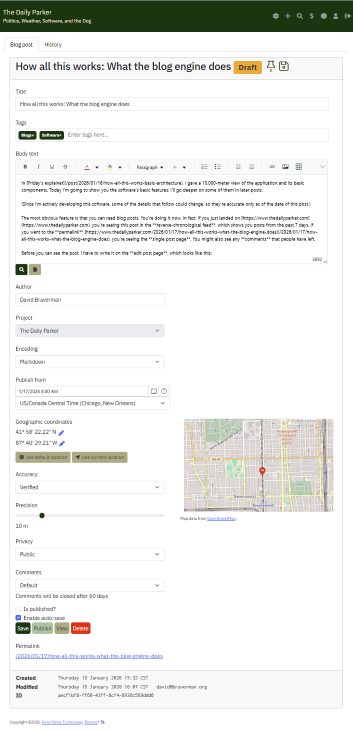
The edit post page has a bunch of features that give me precise control over what you see:
- An indication that the post is a draft next to controls that allow me to save and pin the post
- The title, used to build the permalink
- Tags, which provide a quick way to find posts related to a common topic
- The body text, which is what you're reading
- A preview button, which generates the HTML that you see, so that I can make sure I'm formatting everything correctly
- An author box, pre-populated with the name of whoever is editing if it's a new post
- The project selector, which I'll get into later
- The encoding selector, which defaults to Markdown for new posts but also has settings for HTML (any post before January 2026) and plain text
- A control to set the start date of the post, which allows me to post something in the future (like this post)
- Location controls, to populate the little globe icon you see in the header above
- A selector to open or close comments, which defaults to closing them after 60 days
- Checkboxes that determine whether the post is published and whether the editor auto-saves what I'm working on
- Buttons to save, publish or re-publish, view, or delete the post
- A readout of the metadata about the post, including its permalink, unique ID, owner (the person who created it), and last modified time and editor
- A separate history tab, showing all the changes to the post's metadata (but not to the post text, for reasons I'll get into later)
As you can see above, all these controls are just stacked on one big page. I've put the most frequently used controls at the top and the less-frequently used at the bottom, and a lot of them start off with default values that don't change very often.
Other major features of the UI include:
- Full-text search, which will find any word or set of words in any post
- User profiles, which you can set up if you log in using a Microsoft account (including Outlook, XBox, etc.)
- Administrative tools that let me read the event log, audit log, diagnostic information, the user list, and the project list
Plus a couple of features that you won't necessarily see:
- A flexible permissions architecture, which I will discuss in depth later on
- reCAPTCHA verification for comments
It's a lot, I know! And I'm constantly developing more features, one of which I plan to deploy on Monday.
Let me know in the comments which features you want to know more about.
Copyright ©2026 Inner Drive Technology. Privacy. Donate!